Skip to content
adatum
  • Home
  •  About adatum
  •  Learn Azure Bicep
  •  SCOM Web API
Azure Bicep

Share Bicep modules with private registry

  • 08/11/202107/01/2025
  • by Martin Ehrnst

A common problem for many organizations is to share and consume infrastructure templates. Many ended up with a storage account in Azure, but that had some limitations around versioning and sharing of secrets. Directly consuming templates from a Git repository is another option. However, that’s not exactly problem-free either. For example, what happens if a colleague makes changes, and you reference the template without knowing what has changed. In the best case, a missing parameter will fail your pipeline. In the worst case, you have downtime.

The key concept of having Bicep modules in a common store is for everyone inside your organisation to use these modules when they’re provisioning infrastructure. Picture this scenario. Multiple development team is often using the same type of resource, like Azure SQL, Azure Functions, storage accounts, etc. Your organization likely have a few governance rules applied. Like tagging strategy, allowed SKU, different configuration for test and production and so on. Pre-created and easially consumable modules taking care of this is what you need. Azure Container Registry for Bicep files is now available.

Azure Bicep private registry

With Azure bicep version 0.4.1008 you have a built-in option to publish your Bicep modules to a private registry. The private registry is not a new resource type, in fact, you are uploading your Bicep files to Azure Container Registry which allows you to leverage versioning which will make sure you do not break templates for everyone each time people make changes. Once your Bicep module is uploaded to ACR everyone with permission to pull images can use your modules.

Azure bicep private registry

Upload Bicep modules to ACR

A shared bicep module is used in the same way as a local module, but instead of the local path, you specify the URL and version of the file within the registry. More on that later.

Assuming you already have one Bicep module or a set of them, you only need to provision a container registry. To push the “image” you need acrPush permissions and to consume you need acrPull. Below is the syntax used for uploading a bicep file to ACR.

az bicep publish storage.bicep --target br:exampleregistry.azurecr.io/bicep/modules/storage:v1

I am using this code base against my existing registry, so my command to upload is as follows;

bicep publish .\Bicep\3.modules\sql.bicep --target "br:acrbicepehrnst.azurecr.io/modules/azuresql/sql:v0.1"

No response is given on successful upload, but to make sure everything is alright we can confirm with this PowerShell command, which will list all repositories in your registry.

upload Bicep module to Private registry
Get-AzContainerRegistryRepository -RegistryName acrbicepehrnst

Using modules from the registry

Including modules from a private registry is as easy as using local modules. With Bicep extension enabled in VSCode, you also get validation of the remote modules.

pssst… if you by any change use EMACS you can have the same through LSP and Bicep Lang server
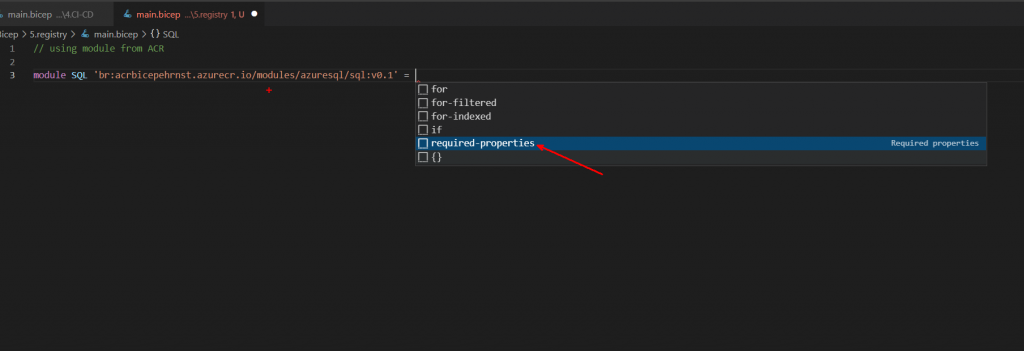
upload Bicep module to Private registry - syntax highlight
var tags = {
  'owner': 'Martin Ehrnst'
  'purpose': 'Bicep demo'
}

module SQL 'br:acrbicepehrnst.azurecr.io/modules/azuresql/sql:v0.1' = {
  name: 'sqlDeploy'
  params: {
    databaseName: 'moduletest'
    dbAdId: '8776fb6e-5de0-408c-be03-c17a67b079d0'
    dbAdLoginName: 'name@company.com'
    env: 'prod'
    tags: tags
  }
}

Summary

In this post I have showed you the core concept, how you upload and how you consume the modules. To me this is only half the story. In my next post I will go through how we can put everything inside a pipeline and add a better versioning to the modules.
Azure Bicep private registry is probably here to stay. Upuntil now it is the best solution to share infrastructure templates within an organization.

Share this:

  • Share on LinkedIn (Opens in new window) LinkedIn
  • Share on X (Opens in new window) X
  • Share on Reddit (Opens in new window) Reddit
Azure Bicep

Azure Bicep modules, variables, and T-shirt sizing

  • 02/07/202107/01/2025
  • by Martin Ehrnst

With infrastructure as code, we strive to parameterize, re-use as much as possible, and make our code as modular as possible. As your application infrastructure grows, it might become too much work to have everything decoupled and modular. But for ad-hoc deployments, “bread and butter” resources we can make things very agile. Azure Bicep modules, variables and parameters are here to help

At the moment I am collaborating on rewriting some of our infrastructures to use Azure Bicep. This infrastructure is set up multiple times for different environments like test and production, but they are mostly identical when it comes to the resources used. Therefore all resources now exist as Azure Bicep Modules. The modules themselves handle the different configurations based on the environment being provisioned. test environments using a smaller number of nodes in the AKS for example.

Bicep Modules

Bicep modules are here to help us abstract the complexity of our deployment templates. Make it easier to re-use and share the templates across environments, applications, and teams. It is totally up to you how you create and structure your modules, as all .bicep files can be used as a module. You can also include as many individual resources you like. In the end, bicep will combine all module files and create a nested deployment.

If you have ever worked with nested deployments in ARM templates, you will be glad Bicep modules now exist.

Below I have added a fairly simple module that will provision a storage account with the inputted storageName parameter. In my main.bicep file I will ask for this parameter, and pass it down to my module. The main file is actually more complex than the module file, as its also provisioning a resource group that the storage account will be in.

Environment sizing with Bicep modules

With the above example in mind. How can we move from that to a more complex and re-usable scenario? First of all, we need to accept a few more inputs in our main file. But the complexity will need to be handled inside our storage account module. Our goal is to re-use the module regardless of the environment being provisioned. Therefore we need to handle scenarios like name, storage SKU, and so on. I use a storage account as an example here, but the concept is the same regardless of resource types.

Configuration variables

To extend my module’s modularity (sorry) I am expanding the required input parameters, but I also added an object variable to hold my configuration settings for the different environments. Looking at the storage account module now, you can see the new variable, and also how I get the data from within the object variable by using the inputted name for environment.

I also added more smartness to the module, by using the toLower function and concatenating the storage account name with a unique string based on our resource group. This way we move the complexity of naming the storage account from the user to the code it self. Storage accounts only accepts lower case in its name, and it needs to be globally unique.

The main file changed slightly as well. As you can see, I added environment parameter, with two allowed values, prod and test. I also have a tags variable that I pass down to the module as input parameter together with the environment. The resource group name now has environment represented in the name as well.

Tags and naming conventions is of course very domain specific, but this example show how you can use the different functions available in Azure Bicep to create a more elastic code for your specific environments where resource types is shared.

Summary

In the above examples, I showed how you can use Bicep Modules, parameters and variables to re-use your templates cross multiple environments with different properties. If you like me, have multiple environments that on the technology side is identical, but properties like network addresses, virtual machine families, etc differs. You can use modules and custom variable to handle it.

Stay tuned for more Bicep posts in the near future.

Share this:

  • Share on LinkedIn (Opens in new window) LinkedIn
  • Share on X (Opens in new window) X
  • Share on Reddit (Opens in new window) Reddit
Azure DevOps

Automate Azure DevOps like a boss

  • 23/06/202107/01/2025
  • by Martin Ehrnst

Over the past weeks, I have worked on automation within Azure DevOps. One of the tasks was to create a self-service tool for our developers to create new projects where all pre-requisites were taken care of. That means the project itself, service connections (ARM) to access our Azure Kubernetes Service (AKS), Azure AD groups for accessing the project, and so on.

For the Azure AD part, I had mostly everything in place already. Service connections for Azure AD are essentially Azure application registrations, and Azure AD groups are easily created using New-AzADGroup or Microsoft Graph API. However, my experience with Azure DevOps API was and still is limited.

Creating the project

Creating the project itself is pretty straightforward. Below is a PowerShell snippet to do so. I used a service account and a Personal Access Token (PAT) with the following access permissions to do everything in my code.

  • Graph, read/manage
  • Identity, read/manage
  • Member Entitlement Management, read/write
  • Project and team, read/write/manage
  • Security, manage
  • Service connections, read/manage/query

Assigning permissions using Azure DevOps API

You don’t get far with just a project. Someone needs to have access to it as well. Since I try to create a paved road for the DevOps users I needed to add users to the DevOps groups inside the project. Here I spent some significant time, trying to understand how. In my routine, I already create three AAD groups for Project Administrators, contributors, and readers. We want to have one single pane for managing access to company resources, and Azure AD is the place.

In my opinion, access control in Azure DevOps is a nightmare, but lets not focus on that. I want to add each AAD group in to it’s corresponding Azure DevOps group.

To do that you use Azure DevOps Graph and the Groups endpoints. What you can see in the Microsoft example is that you need to perform a post operation against https://vssps.dev.azure.com/{organization}/_apis/graph/groups?groupDescriptors=vssgp.Uy0xLTktMTU1MTM3NDI0NS0yMTc2MDU2ODQ4LTMyODAwNzczODUtMjM4NDQzMDA4Mi0yNTc3Njk3NTA4LTEtNzM0NDQ1NzM2LTQwNzkyNzIyNjgtMzA0NzY5MjIyMy0yMjg2NTY0ODM0&api-version=6.1-preview.1

Azure DevOps Descriptor

From the documentation, you can see the request to add AAD groups into a project group like Project Administrators you need to specify a groupDescriptor. I could not find any good information on how to get this information, and as you can see, the request does not specify the project, only at the organization level.

Now, after some digging, I figured I could fetch this information with some additional calls to the API.

  1. Get your project descriptor, by using the projectId as your descriptor…
  2. Get all groups within the project, using the actual project descriptor
  3. Filter the groups you want from the above request
  4. Pass the Azure AD group objectId in the body and POST against /graph/groups?groupDescriptors=

Modify Azure DevOps project features

In our case, we do not use all features in Azure DevOps. I, therefore, wanted to turn off some features like boards. Making it a bit more difficult for our developers to start using features that we have other tools to support. I couldn’t find any official endpoint documented, so I reached out on Twitter to get inputs. Of course fellow MVP Rob Bos had some time to inspect the portal calls and came up with the solution. Basically, after the project is created, you need to make additional calls to an old API to flip the switch for each feature you do not use.

Adding ARM service connections to project using DevOps API

This part is quite well documented. So after creating the app registrations and service principals in Azure AD. You need to create the service connection(s) in the project. In my case I had more than one service connection, so I had to run this snippet multiple times, as I could not find a batch operation for it.

I think that pre-provisioning of the service connections are a good idea. This feature is quite complex to grasp for many, as the built in wizard cause more confusion than it helps. Especially when the users try to create a new SC, and they do not have access to create App registrations in Azure, or to set permissions on the subscription. Then the entire wizard will fail, but you might end up with ghost SPNs in Azure…

I said it was properly documented, but if you take a close look. The endpoint is called servicendpoint and not serviceconnection which is what it is called in the portal.

Automation solutions for Azure DevOps

In my examples I use the native Azure DevOps APIs and PowerShell. This worked best in our solution. However, you can also use Azure CLI or Azure DevOps provider for Terraform.

Since we do not use Terraform for any IAC, I weren’t keen to start using it just for Azure DevOps. Azure CLI have some limitations since it only allow interactive login, or a semi-solution for the PAT. I suggest you see what solution that works for you. But my examples above do at least work.

Summary

In this post I showed how I solved Azure DevOps project creation. The code above only show half the solution as it is very domain specific. However, I hope it helps you along the way. Creating the actual project is only one part of it. You need to create a paved road for the users. Therefore, make sure the users are able to access their projects and deploy resources. Automating the setup will ensure that every project is set up equally and supporting future requests from your developers will be much easier.

Share this:

  • Share on LinkedIn (Opens in new window) LinkedIn
  • Share on X (Opens in new window) X
  • Share on Reddit (Opens in new window) Reddit

Posts pagination

1 … 3 4 5 6 7 … 18

Popular blog posts

  • Azure Application registrations, Enterprise Apps, and managed identities
  • Migrate from Azure DevOps to GitHub - what you need to know
  • Azure token from a custom app registration
  • GitHub actions federated identity with Azure AD
  • RunAsRadio - App registrations and enterprise apps

Categories

Automation Azure Azure Active Directory Azure Bicep Azure DevOps Azure Functions Azure Lighthouse Azure Logic Apps Azure Monitor Azure Policy Community Conferences CSP Monitoring DevOps GitHub Guest blogs Infrastructure As Code Kubernetes Microsoft CSP MPAuthoring OMS Operations Manager Podcast Powershell Uncategorised Windows Admin Center Windows Server

Follow Martin Ehrnst

  • X
  • LinkedIn

RSS feed RSS - Posts

RSS feed RSS - Comments

Microsoft Azure MVP

Martin Ehrnst Microsoft Azure MVP
Adatum.no use cookies to ensure that we give you the best experience on our website. If you continue to use this site we will assume that you are happy with it. Cookie Policy
Theme by Colorlib Powered by WordPress