Azure
Azure
Azure Application registrations, Enterprise Apps, and managed identities
This post has been lurking in my drafts for almost two years now, and after a recent discussion with colleagues, it was about time I finish it.
Weekly I get questions about Azure AD application registrations and Enterprise Applications. And since you found this post, you are probably looking for a few answers yourself.
Over the years I have done a lot of work that requires playing around with authentication in Azure. Especially the case I had with the secure application model and Microsoft CSP gave me some good insight into this space. In general, I have limited knowledge of Oauth2, etc. And most of my work in this space has been related to integration with Azure Management APIs
The purpose of this post is to demystify everything around managed identities (MSI), Azure application registrations, and Enterprise Apps. Although Microsoft has this well documented, the context can be somewhat vague. Especially for new developers and IT Pros integrating with the Azure Control plane.
Azure Application registrations
Microsoft has a very robust identity platform in Azure AD. And by creating an application registration you can use this platform to authorize and authenticate various and multiple clients (Mobile, web apps, etc).
When creating an application registration you establish a trust relationship between the Microsofts identity platform and your custom application, meaning you trust Microsoft, but Microsoft does not trust your application in the same way.
You can create single-tenant, multi-tenant, and Microsoft (liveid) based app registrations or a combination of them. But the application definition is only tied to its home directory.

- Single-tenant configuration
- Only principals in the “home” tenant can authenticate.
- Multi-tenant application registrations
- Allows users and applications in other Azure AD tenants to access your app.
- Personal Microsoft accounts
- Here you can allow Microsoft Live ID accounts to access.
Enterprise applications – service principals
App registrations are not very functional on their own. Where App registrations is you custom application definition. Enterprise application is the application identity within your directory (Azure AD). The service principal (enterprise app) can only be assigned access to the directory it exists, and act as an instance of the application.
Relationship between app registrations and enterprise applications.

Enterprise applications (the service principal) have a reference to its Application registration. In most cases, you have one app registration and the service principal (enterprise application) in the same tenant.
When the application is accessible by multiple tenants, all tenants will have one enterprise application. However, the application registration itself will be in its “home” tenant
This can be confusing. But if you look in the enterprise application blade you can find applications from other app vendors being used by you or other users in your directory.
In short: Azure application registrations are the global representation of your custom application, and Enterprise Application is the local representation of the same application, bound to your tenant.
See this post on how to create Application registrations using PowerShell.
Conditional Access
Conditional Access is where you use signals to identify if a user can access your application or not. You then use these signals in an “if-this-then-that” format to decide whether the user can access your application.
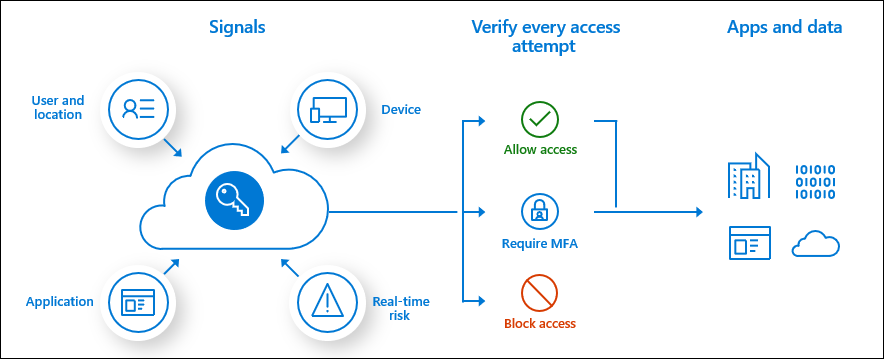
Conditional access is widely used for accessing cloud resources like the Azure Portal or Office 365. However, you can also use the service for your in-house developed applications as well.
Managed identities
Another player in the mix often causing confusion for developers and administrators is Managed Identities. When released, we used the name Managed Service Identities, in short MSI. But recently Microsoft renamed this service to Managed Identities.
Managed Identities is used to assign an identity (service principal) to an Azure resource. You can use this service principle to access other resources, leveraging the built-in authentication and authorization mechanisms you find in Azure.
Managed identities can access other Azure resources or custom applications.
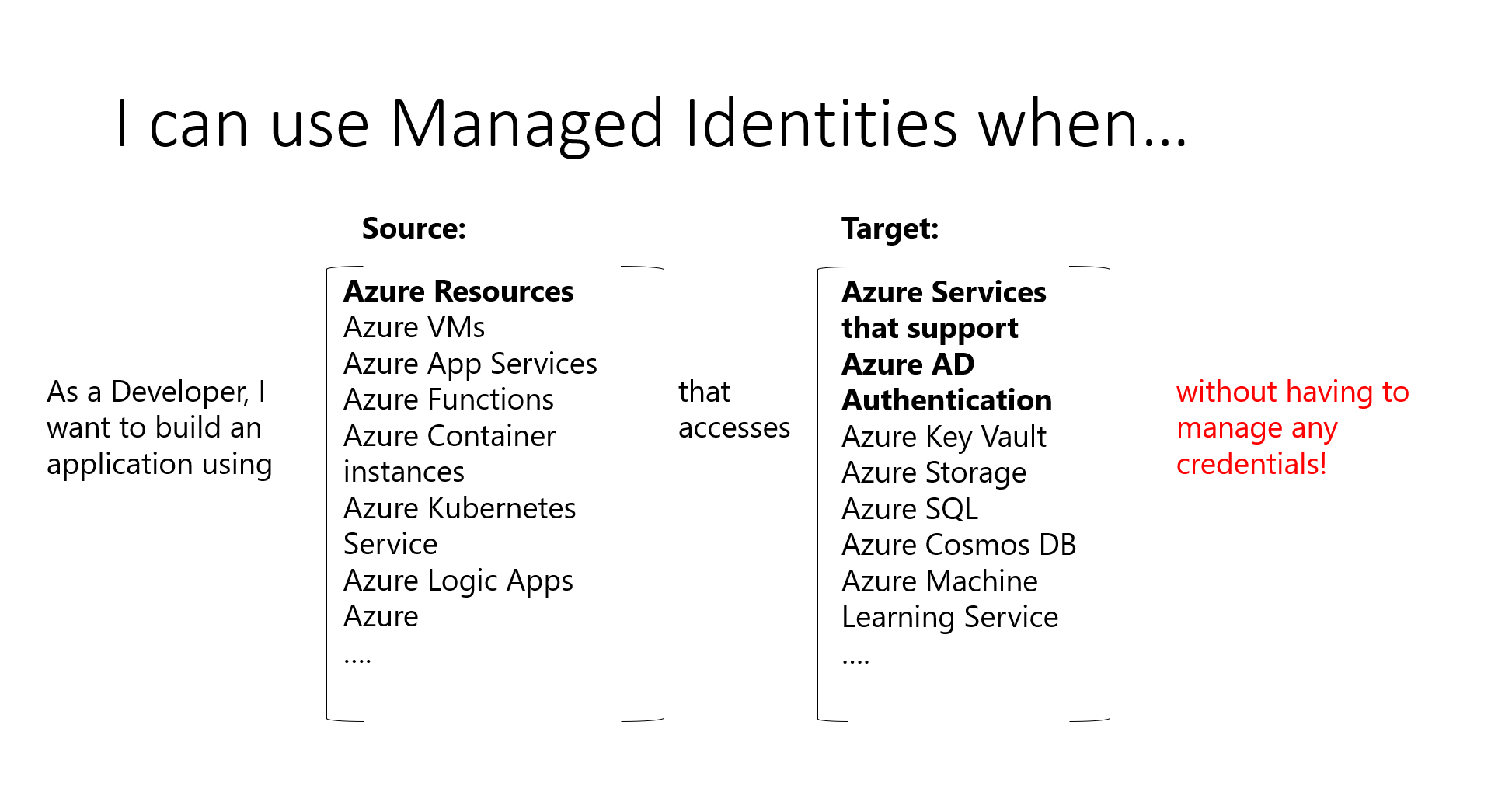
Previously, when we did not have managed identities, we created an application registration for the resource. Using a secret or certificate to authenticate with Azure. This created a lot of overhead, as it required secret management, key rotation, etc. With managed identities, Azure takes care of this for us.
Managed Identities comes in two configurations. One fully managed and tied to a resource, or as an individual resource.
System-assigned managed identity
System-assigned is where you tie the identity to one specific resource. You configure this during resource deployment or assign an identity after it’s deployed.
The service principal created with system-assigned managed identity will follow the resource lifecycle. If you delete the resource, the identity will also be deleted.
User-assigned managed identity
User-assigned managed identities are individual resources. Multiple Azure resources can use one managed identity, or you can use multiple identities for one resource. Microsoft will still rotate keys and secrets. But with user-assigned managed identities you are in control of the service principal lifecycle and general governance.
Summary
There are a lot more to go through when talking about authentication. How to obtain Azure access tokens or how you add Azure login to your website is not covered here. However, I hope this post made the Azure application registrations, service principal, and managed identity space a bit more clear.